If you are serious about sustainable organic growth, there is one tool you cannot afford to ignore:
Most businesses install it.
Very few use it strategically.
At our agency, Google Search Console (GSC) is not just a reporting platform; it is a decision-making engine. It informs content strategy, technical fixes, CRO improvements and long-term organic growth planning.
This guide explains how to use Google Search Console properly, not just operationally, but commercially.
What Is Google Search Console?
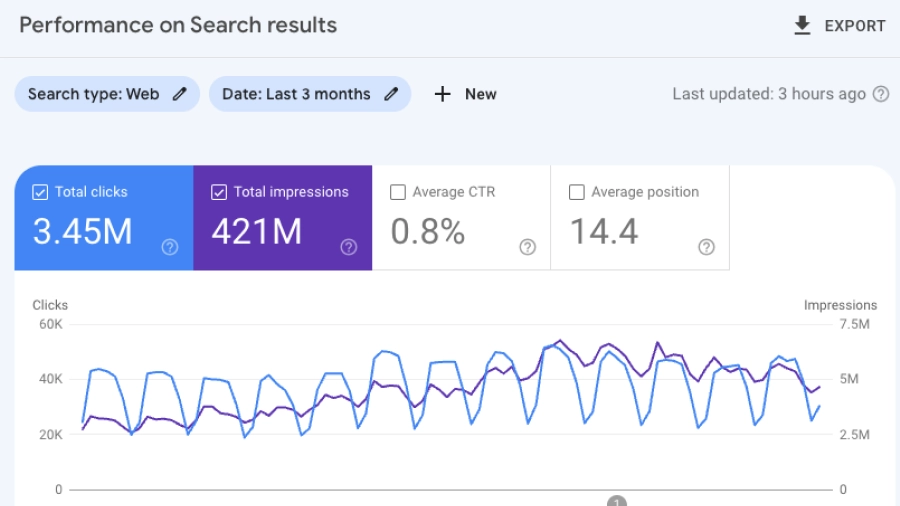
Google Search Console is Google’s free platform that allows you to monitor, analyse and improve how your website performs in organic search.
It shows:
- Which keywords trigger impressions
- How often users click your results
- Your average ranking positions
- Indexing and crawl issues
- Technical errors affecting visibility
- Core Web Vitals performance
- Manual penalties and security issues
Unlike analytics platforms, GSC shows you how Google sees your website, and that distinction matters enormously.
Google Search Console vs Google Analytics
Many businesses confuse GSC with analytics tools.
Here is the difference:
- Google Search Console shows how you perform in Google Search.
- Analytics platforms show what users do after they land on your website.
- Search Console is about visibility and discoverability.
- Analytics is about behaviour and conversion.
If traffic is not growing, GSC tells you why.
How to Set Up Google Search Console Properly
Setting up GSC correctly ensures you capture complete data from day one.
Step 1: Add a Domain Property
Use Domain Property rather than URL prefix where possible. It captures:
- HTTP and HTTPS
- Subdomains
- All variations of your site
- Verification is typically done via DNS record.
Step 2: Submit Your XML Sitemap
Navigate to:
- Indexing → Sitemaps
- Submit your XML sitemap (usually:
- yourdomain.co.uk/sitemap.xml)
This helps Google discover and prioritise your pages.
Step 3: Link to GA4
Connecting GSC with your analytics platform allows deeper performance analysis across ranking and conversion data.
The Performance Report: Your Growth Engine
The Performance report is where serious SEO happens.
It shows:
- Clicks
- Impressions
- CTR (click-through rate)
- Average position
This data reveals growth opportunities most businesses overlook.
1. Find Page Two Keywords (Positions 8–20)
Filter by average position between 8 and 20.
These keywords are close to page one.
Small improvements in content depth, internal linking and optimisation can produce disproportionate traffic gains.
2. Identify High-Impression, Low-CTR Queries
If impressions are high but CTR is low:
- Improve your page title
- Rewrite your meta description
- Add structured data
- Make the headline more benefit-driven
Often, this alone increases traffic by 15–40%.
3. Analyse by Page, Not Just Keyword
Filter by page first.
Then analyse which queries drive impressions.
This reveals:
- Keyword cannibalisation
- Missing subtopics
- Intent mismatch
- Content gaps
How to Use Google Search Console for Keyword Research
Most people think keyword research happens in external tools.
Advanced SEO teams use GSC to:
- Discover emerging queries
- Identify long-tail variations
- Spot commercial intent terms
- Find featured snippet opportunities
Practical Workflow
- Filter by page.
- Export all queries.
- Group by intent.
- Identify patterns.
- Expand content accordingly.
This ensures you optimise around real search demand; not assumptions.
Indexing & Coverage: Fixing Technical Issues
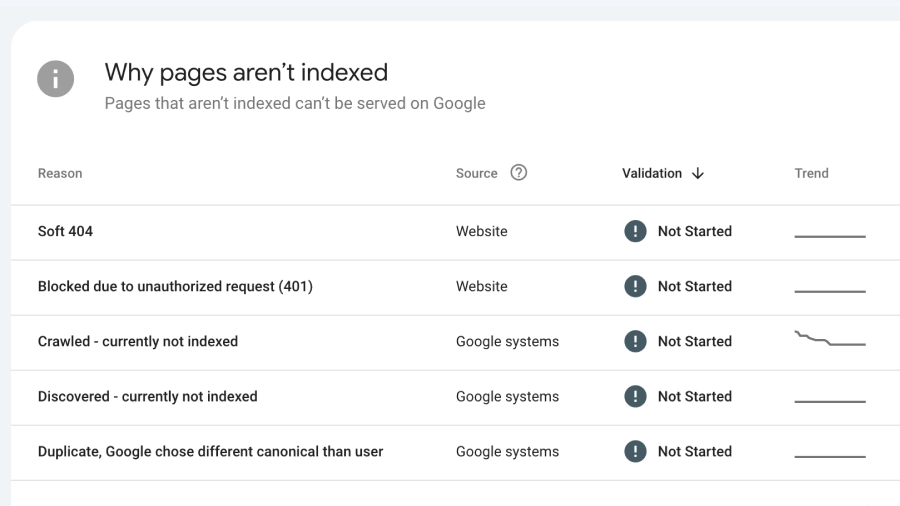
The Indexing report shows whether Google can access and store your pages.
Common issues include:
- Crawled – Currently Not Indexed
- Google saw the page but chose not to index it.
Often caused by:
- Thin content
- Duplicate topics
- Weak internal linking
- Low perceived value
Discovered – Currently Not Indexed
Google found the URL but has not crawled it yet.
Often crawl budget or authority related.
Duplicate Without User-Selected Canonical
Google selected a different version of your page.
This may indicate:
- Parameter issues
- HTTP/HTTPS conflicts
- Internal linking inconsistencies
Ignoring these warnings suppresses growth.
Fixing them unlocks it.
URL Inspection Tool: Advanced Diagnostics
The URL Inspection tool allows you to:
- See if a page is indexed
- Test live URLs
- View canonical selection
- Diagnose structured data errors
- Request indexing
This is critical when:
- Launching new landing pages
- Publishing commercial content
- Recovering from traffic drops
- Testing technical changes
Using Google Search Console to Increase Organic Traffic
Here is the strategic framework we apply for clients:
Step 1: Identify High-Impression Pages
Filter pages with strong impressions but moderate rankings.
Step 2: Improve Content Depth
Expand:
- FAQs
- Internal links
- Supporting subtopics
- Commercial intent sections
Step 3: Optimise for CTR
Refine:
- Titles
- Meta descriptions
- Rich snippets
- Clear value propositions
Step 4: Strengthen Internal Linking
Use contextual links from high-authority pages.
Step 5: Monitor for 30 Days
Compare date ranges to measure uplift.
This cycle, repeated monthly, compounds growth.
Advanced Google Search Console Strategies
1. Regex Filtering
Use regex filters to segment:
- Question-based queries
- Branded vs non-branded
- Purchase-intent terms
2. Date Comparison Analysis
Compare last 28 days vs previous period to:
- Detect declining pages
- Identify seasonal patterns
- Spot algorithm impact early
3. Cannibalisation Audits
Filter by query → view multiple pages ranking.
Consolidate content where necessary.
4. Content Refresh Identification
Pages with:
- Declining impressions
- Stable rankings but reduced clicks
- Seasonal volatility
These often need updating, not rebuilding.
Common Google Search Console Mistakes
- Checking it only monthly
- Ignoring CTR entirely
- Panic over temporary indexing delays
- Treating it as a reporting tool instead of a growth tool
- Failing to act on query data
Data without implementation does nothing.
When Should You Bring in an Agency?
Google Search Console shows what is happening.
It does not:
- Rewrite your content
- Fix technical architecture
- Improve site speed
- Implement schema
- Design conversion funnels
If your site:
- Has stagnant traffic
- Is not ranking for commercial terms
- Has indexing problems
- Struggles to scale organic revenue
You need more than monitoring.
You need strategic implementation.
Final Thoughts
Google Search Console is the single most powerful free SEO tool available.
Used passively, it shows you numbers.
Used strategically, it drives revenue.
The difference lies in how deeply you interpret the data and how effectively you act on it.
If you would like a full technical and content audit using Google Search Console data, our team would be happy to provide a comprehensive organic growth review.