What Google announced and why it matters
On 24 March 2026, Google Search began rolling out the March 2026 spam update globally, across all languages. Google noted rollout “may take a few days to complete,” and the incident is publicly tracked on the Google Search Status Dashboard.
Google described this as a “normal spam update”. In plain terms: it’s an update to Google’s spam detection and enforcement systems, not a redesign of how relevance works, and not a “core update” announcement.
If your site sees a drop after a spam update, Google’s own guidance is blunt: review the spam policies. Sites violating those policies can be ranked lower or not appear at all, and improvements can take time because Google’s automated systems may need months to learn that a site is consistently compliant after changes are made.
A key nuance for SMEs: Google also notes that if the change is specifically a link spam update, removing or changing spammy links may not “bring rankings back” if what you lost was an artificial boost because once the link benefit is removed, it cannot be regained. (That doesn’t mean you shouldn’t clean up link risk; it means you shouldn’t expect a magical rebound from deleting a few dodgy backlinks.)
March 2026 Spam Update: Early Signals
Google’s March 2026 spam update is already causing significant movement across search results.
Here’s what industry tracking tools are showing in the days following the rollout:
Semrush
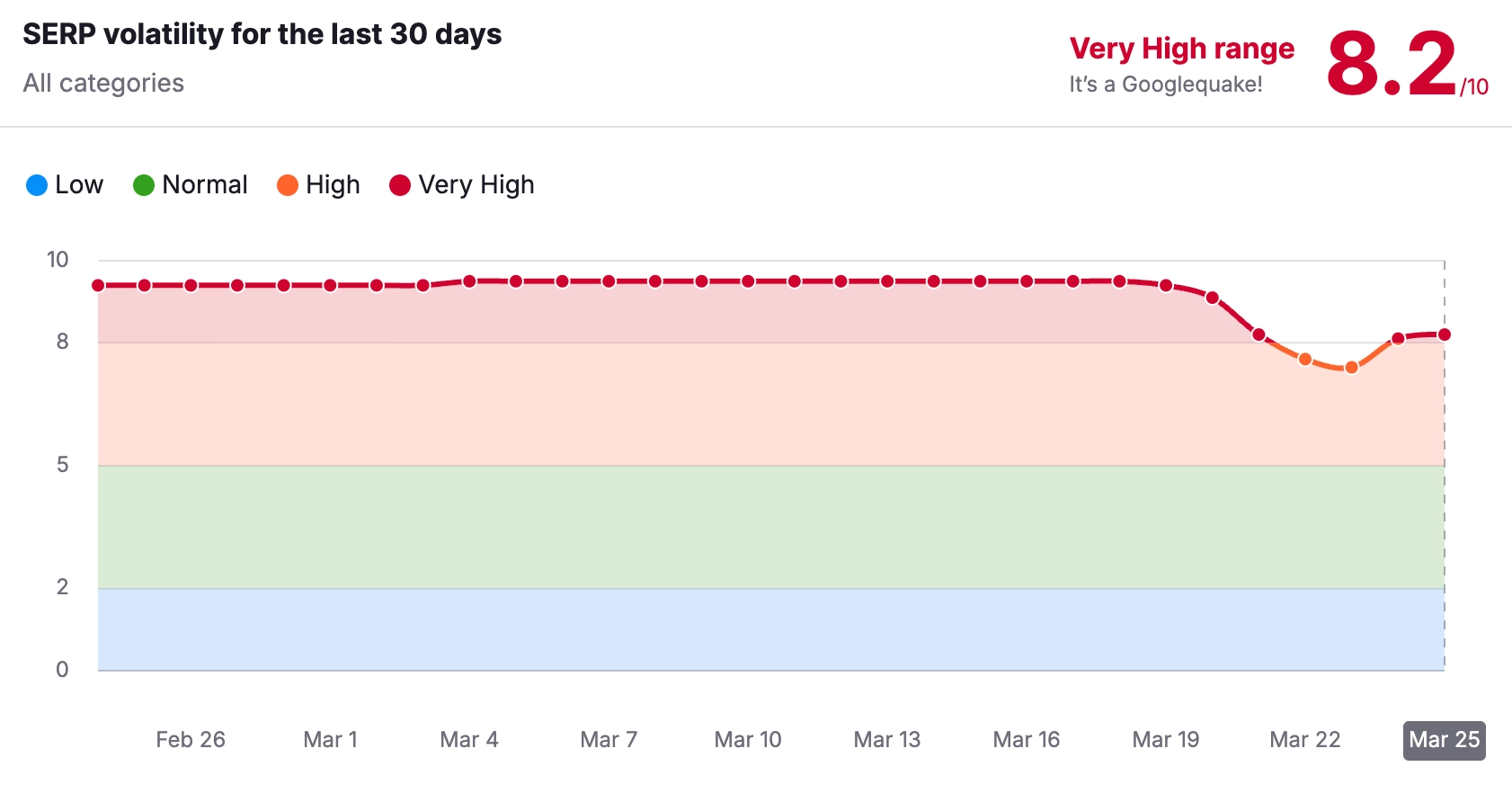
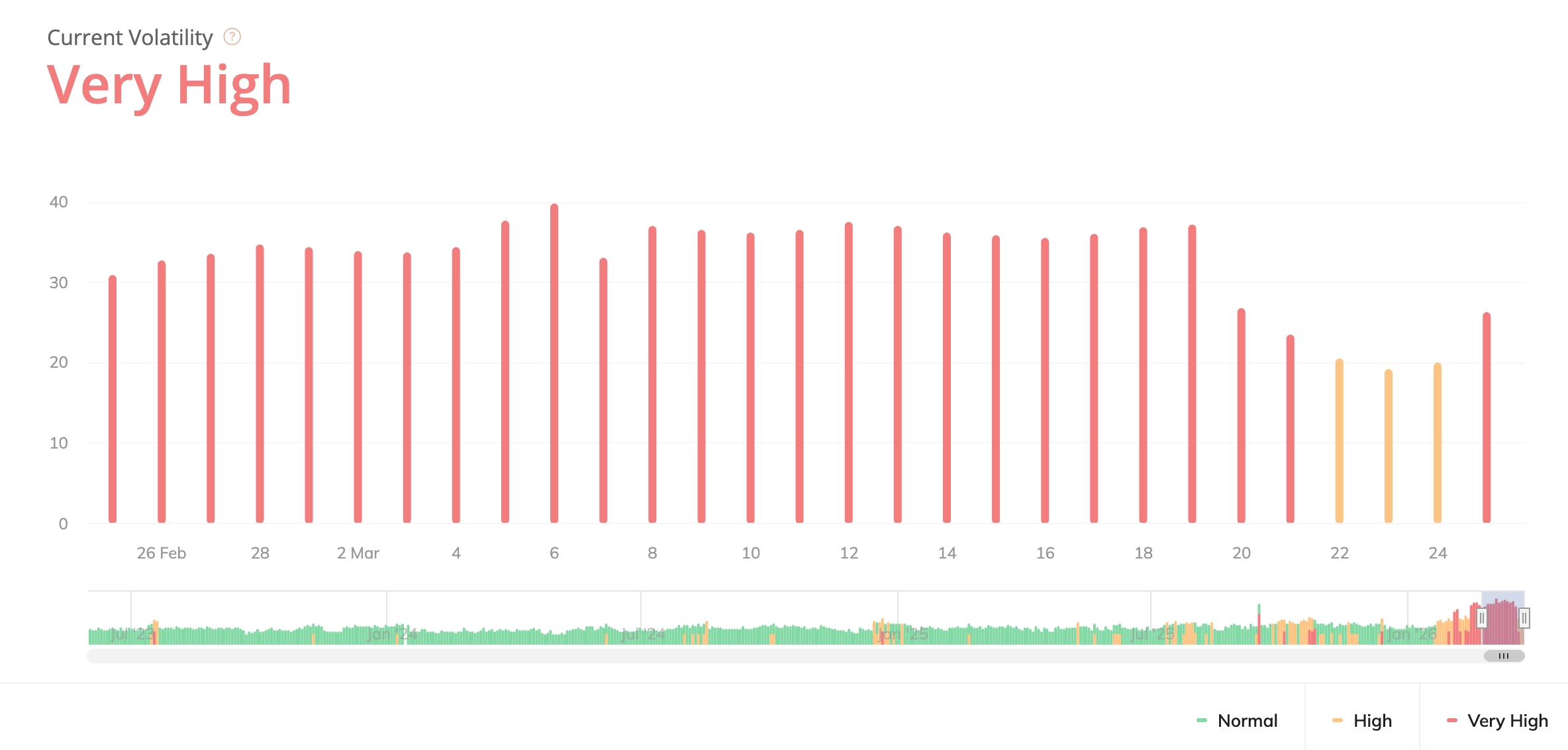
We’re currently seeing very high SERP volatility, which typically indicates widespread ranking fluctuations and algorithm recalibration across multiple industries.
This level of movement is often associated with:
- Increased filtering of low-value or scaled content
- Ranking reshuffles across competitive queries
- Broader enforcement of spam-related signals
If you’ve noticed changes in rankings or traffic this week, you’re not alone — this is a widespread update affecting a large number of sites.
Symptoms and fast diagnostics before you change anything
The biggest mistake teams make during rollout week is “fixing” the wrong problem (or making sweeping changes that destroy evidence). Your first goal is to confirm three things:
First, confirm it’s actually Google organic. Use Google Search Console to compare clicks and impressions week-on-week, then segment by:
- Search type (Web)
- Queries (brand vs non-brand)
- Pages (which URLs dropped most)
- Countries (UK only vs global)
Second, rule out manual actions. Spam updates are algorithmic, but manual actions can happen at any time. Google states that manual actions are issued when a human reviewer determines pages aren’t compliant with spam policies, and they can cause some or all of a site not to appear in results, Search Console will notify you in the Manual actions report and message centre.
Third, check indexing health. A spam update impact can look similar to an indexing issue (big drops, lots of pages falling out). In Search Console’s indexing reports, look for spikes in “Crawled – currently not indexed”, “Discovered – currently not indexed”, canonical conflicts, or robots/noindex changes. (If these are spiking, treat it as a technical/indexing incident first.)
Rapid triage flowchart
Use this flow in a working session. It’s designed to be completed in about an hour on most SME sites.
Start here: “Traffic dropped — what now?”
A. Confirm the drop
- If only Google organic is down (and Direct/Paid/Email are stable), continue to B.
- If everything is down, treat as tracking/site outage first (analytics tag, CMS issue, hosting errors).
B. Check manual actions
- If Search Console shows a manual action, stop and follow the manual action remediation process (skip to the recovery section). Google explicitly states manual actions relate to spam policy violations and are surfaced in Search Console.
- If none, continue to C.
C. Check indexing
- If indexing errors surged or key pages are no longer indexed, prioritise technical/indexing fixes.
- If indexing is stable, continue to D.
D. Identify the “pattern” Look at the pages that dropped and ask:
- Is it a templated section (hundreds of near-duplicates)?
- Is it a location/service matrix?
- Is it thin affiliate/reviews content?
- Is it third-party content hosted to “borrow” authority?
- Is it a sudden influx of new pages or AI-generated pages?
If yes to any, go straight to the checklist section below and start with the matching risk category.
E. Hold changes until you’ve captured a baseline Before edits:
- Export the top losing queries and URLs from Search Console (last 7–14 days vs prior period).
- Snapshot key directories (example: /locations/, /blog/, /compare/, /guides/).
This baseline prevents you “fixing blind” and lets you prove recovery.
The SME audit checklist
This checklist mirrors Google’s spam policy categories and the patterns most commonly associated with spam-related demotions. Google’s spam policies describe spam as techniques that manipulate ranking systems or deceive users, and they list specific prohibited practices (including scaled content abuse, doorway abuse, expired domain abuse, site reputation abuse, link spam, and more).
Scaled or templated content risk
Why it matters: Google defines “scaled content abuse” as generating many pages primarily to manipulate rankings and not help users often unoriginal, low-value content, regardless of how it’s produced.
Audit checks
- Do you have large clusters of pages that are:
- Very similar in structure and copy?
- Thin (few unique insights, generic summaries)?
- Made to “cover every keyword variation” rather than solve a user problem?
- Have you recently published many pages quickly using AI or automation without substantial editorial value-add?
Google explicitly lists examples such as generating many pages with generative AI “without adding value”, scraping feeds/search results to generate pages, stitching content without value, or creating multiple sites to hide scale.
Fixes that work for SMEs
- Consolidate near-duplicates into one stronger page.
- Add unique value that only you can provide: real process, pricing realities, UK-specific considerations, FAQs grounded in sales calls, screenshots, examples.
- Kill pages that exist only to “be indexed” and don’t serve a real intent.
Doorway and location-page traps
Why it matters: Google defines doorway abuse as pages created to rank for similar queries that funnel users to intermediate pages and are less useful than the final destination. Examples include creating many “city pages” that funnel to one page, or substantially similar pages that sit closer to search results than a clear, browsable hierarchy.
Audit checks
- Do you have dozens of location pages that are essentially the same page with a swapped town name?
- Are those pages mainly funnel pages (“Call us”, “Get quote”) with little unique local insight?
- Are users effectively being pushed to one final service page anyway?
Fixes
- If you need local pages, make them genuinely local: projects, testimonials, service constraints, local FAQs, local compliance factors, and content unique to that location.
- Otherwise, collapse into a single strong “Areas served” page plus strong internal linking.
Site reputation abuse and third-party content
Why it matters: Google defines site reputation abuse as publishing third‑party content mainly because the host site already has ranking signals; the goal is for that content to rank better than it would on its own. Google notes third-party content isn’t inherently a violation; it’s the intent and exploitation of host reputation that’s the problem.
Audit checks
- Do you host “partner” pages, white‑label coupon/review sections, advertorial hubs, or off-topic content that doesn’t fit your brand?
- Is any third-party section producing lots of pages quickly, often targeting unrelated commercial queries?
Fixes
- Remove, noindex, or fully integrate and editorially own the content (with real oversight and relevance).
- Tighten topical focus: if it would confuse a real customer to see it on your site, it’s a red flag (Google’s examples explicitly discuss confusing-topic third-party pages).
Expired domain or repurposed-domain risk
Why it matters: Google defines expired domain abuse as purchasing an expired domain and repurposing it primarily to manipulate rankings by hosting low‑value content. Illustrative examples include affiliate content on a former government site or casino content on a former school domain.
Audit checks
- Did you migrate to, buy, or inherit a domain with a different historical purpose?
- Does the current content/topic mismatch the domain’s historic footprint?
Fixes
- If you legitimately acquired a domain for a real business transition, make continuity and legitimacy obvious: strong “About”, clear brand identity, clean redirects, and topical consistency.
- Remove content that exists solely to monetise legacy authority.
Link spam and risky authority tactics
Why it matters: Google defines link spam as creating links to or from a site primarily to manipulate rankings. Their examples include buying/selling links for ranking purposes (money for links/posts), exchanging goods/services for links, sending products in exchange for links, excessive link exchanges, automated link creation, and paid advertorial/native advertising that passes ranking credit.
Audit checks
- Sudden growth in exact-match anchor text?
- Paid placements, “guest post bundles”, sponsored content without proper link qualification?
- Large-scale link exchanges or partner pages used mainly for cross-linking?
Fixes
- Stop any activity that violates policy immediately.
- For outbound paid/native links, ensure they’re properly qualified (Google explicitly references “qualifying the outbound link” where appropriate).
- For inbound risk: prioritise removal where possible; focus on replacing with earned links (PR, partnerships, real coverage).
Expectation management Google explicitly warns that if an update removes the effects of spammy links, any ranking benefit that previously existed is lost and can’t simply be “regained” by cleaning up.
Hidden text, keyword stuffing, and other classic spam signals
Even modern spam updates still sit on top of long-running policy areas:
- Hidden text/link abuse (content placed solely to manipulate rankings, not visible to users).
- Keyword stuffing (filling a page with keywords/numbers to manipulate rankings).
- Sneaky redirects and cloaking (showing different content to search engines vs users).
Audit checks
- Any CSS/JS tricks that reveal keyword blocks only to bots?
- Any “footer keyword clouds”, hidden city lists, or invisible internal links?
- Mobile redirects that send users somewhere unexpected?
Hacked content and user-generated spam
Google’s spam policies explicitly cover hacked content, and separately call out user-generated spam (spammy content added by users in public areas like forums and comment sections).
Audit checks
- Spikes in indexed URLs you didn’t create (often in weird folders, query strings, or gibberish slugs).
- Unexpected redirects, injected links, or new pages.
- Comment spam / profile spam on public pages.
Fixes
- Lock down forms, add moderation, apply nofollow to UGC links where needed.
- Patch vulnerabilities and clean infected pages.
What not to do during rollout week
Do not panic-delete your entire blog or disavow your whole link profile based on a gut feeling. Here’s why:
Google’s documentation makes it clear that spam update recovery can take time, your changes might help, but automated systems may need months to learn sustained compliance. If you nuke thousands of URLs without a plan, you can create permanent traffic loss that has nothing to do with the update.
Do not “fix” with more volume. If your site has scaled or templated sections, responding by publishing another hundred pages is exactly the wrong pattern especially because Google explicitly lists mass-generated pages “without adding value” as an example of scaled content abuse.
Do not ignore manual actions. If Search Console flags a manual action, you must resolve the specific issues and follow the review process (below). Google states manual actions are human-applied and will be visible in Search Console.
Recovery timelines and next steps
If there is no manual action
Treat this as an algorithmic evaluation problem: improve compliance and quality, then be patient. Google’s guidance suggests that post-fix improvements can occur if systems learn over time (they explicitly note “over a period of months”).
Your best near-term KPI isn’t “rankings returned tomorrow”; it’s:
- Index stability
- Crawl stability
- Fewer low-value pages
- Clearer site structure
- Higher quality in priority pages
If there is a manual action
Follow Google’s process:
- Fix the spam policy violations.
- Then request a review inside Search Console’s Manual actions report (Google describes the “Request Review” workflow and the expectation to provide examples of removed bad content and added good content).
A reconsideration request is specifically defined by Google as asking them to review your site after you fix problems identified in a manual action or security issue notification.