On this page
For digital marketers and website owners, optimising website speed is crucial for enhancing user engagement and improving search rankings. A fast-loading site is a key factor in retaining visitors and achieving better conversions. Website speed is the rate at which a webpage loads and responds to user interactions, typically measured in seconds.
Running a website speed test helps identify performance issues such as large images, slow scripts or inefficient hosting that may be affecting page load times.
Why Website Speed Matters
Search engines increasingly prioritise fast-loading websites. Google uses performance metrics such as Core Web Vitals and page load speed as ranking signals.
Faster websites provide several advantages:
- Improved search rankings
- Better user experience
- Higher conversion rates
- Lower bounce rates
- Stronger overall SEO performance
Even a one-second delay in loading time can significantly reduce user engagement and sales.
How to Run a Website Speed Test
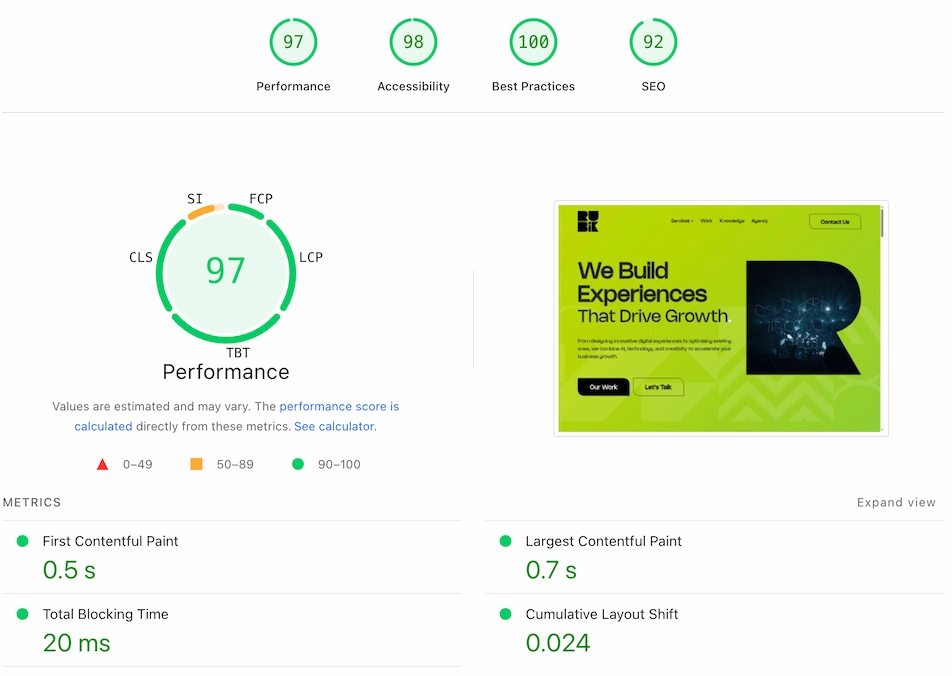
A website speed test analyses how quickly a webpage loads and identifies the elements slowing it down. In this context, tools like Google PageSpeed Insights and GTmetrix are essential for obtaining detailed reports.
The process typically includes:
- Testing page load time
- Analysing server response speed
- Reviewing image optimisation
- Checking script performance
- Evaluating Core Web Vitals
Several tools can perform these tests automatically and provide detailed reports.
Best Website Speed Test Tools
Google PageSpeed Insights
Google PageSpeed Insights is one of the most widely used tools for analysing website performance. It evaluates both mobile and desktop performance and provides recommendations to improve loading speed.
The tool measures important metrics including:
- Largest Contentful Paint (LCP)
- First Contentful Paint (FCP)
- Cumulative Layout Shift (CLS)
- Time to Interactive (TTI)
Because the tool is created by Google, its recommendations align closely with search engine ranking signals.
GTmetrix
GTmetrix provides detailed performance reports including waterfall charts that show exactly how resources load on a webpage.
It is particularly useful for diagnosing slow scripts, large images and inefficient code.
Common Causes of Slow Website Loading
If your website loads slowly, several factors may be responsible.
Large Image Files
Uncompressed images are one of the most common reasons for slow loading webpages.
Too Many JavaScript Files
Excessive scripts increase page load time and delay interactivity.
Slow Hosting Servers
Low-quality hosting providers often result in slow server response times.
Unoptimised CSS and Code
Bloated code increases file sizes and slows down page rendering.
Too Many Third-Party Plugins
Plugins, tracking scripts and advertising tags can significantly affect loading speed.
How to Improve Website Loading Speed
Improving website speed often requires a combination of technical optimisation and performance monitoring.
Key improvements may include:
- Compressing and resizing images
- Minifying CSS and JavaScript
- Using faster hosting infrastructure
- Implementing browser caching
- Using a content delivery network (CDN)
These improvements can dramatically reduce page load time and improve user experience.
Common Mistakes to Avoid
Avoiding certain pitfalls can make a significant difference to your website's loading speed. Refraining from using too many plugins or failing to optimise images are frequent errors. Neglecting server maintenance and underestimating the impact of CSS and JavaScript can also hinder performance.
Key Takeaways
- Fast-loading sites rank better and provide improved user experiences.
- Tools like Google PageSpeed Insights and GTmetrix are valuable for speed analysis.
- Optimising images, scripts, and code is crucial for better performance.
- Avoid excessive plugins and poorly optimised scripts to improve speed.
- Consistently monitor and refine your site’s performance for sustained benefits.
Improving Website Performance
Running a website speed test is the first step towards improving performance. By identifying technical issues and implementing optimisation strategies, businesses can significantly improve page speed and overall search visibility.
Fast websites not only rank better in search engines but also deliver a smoother user experience that encourages visitors to stay, explore and convert.
Frequently asked questions
Google PageSpeed Insights is one of the most widely used tools because it measures performance using Google’s own ranking metrics.