Key takeaways
- 5,004 wordPress login attempts in 14 days across 26 websites we host
- 11,000+ probes for secrets and backdoors .env, .git and webshell files
- 17 of 20 non-WordPress sites still scanned for WordPress weaknesses
On this page
- Website Maintenance Prices at a Glance (2026)
- What Your Website Is Up Against: 14 Days on Our Servers
- What Website Maintenance Actually Includes
- The Running Costs That Are Easy to Forget
- How Much Does WordPress Maintenance Cost?
- Pay-As-You-Go vs a Monthly Care Plan
- What Happens If You Don’t Maintain Your Website?
- A Real Example: The Staging Site Nobody Was Watching
- How to Work Out What Your Website Needs
- Questions to Ask Before You Sign a Maintenance Contract
Website maintenance in the UK typically costs between £50 and £500 a month. A small brochure website usually costs £50–£150 a month to maintain properly, a business-critical WordPress site £150–£500, and an ecommerce or custom-built platform £500–£2,000+. Over a year, most businesses spend £600–£6,000 keeping their website secure, fast and working.
That range is wide because "maintenance" means very different things to different providers. Some plans cover little more than clicking the update button. Others include security monitoring, tested updates, performance work, backups you can actually restore and a developer who picks up the phone when something breaks.
This guide explains what website maintenance costs in the UK in 2026, what each price level should include, the running costs that are easy to forget, and how to decide what your website actually needs.
Website Maintenance Prices at a Glance (2026)
| Type of Website | Typical Monthly Cost | What It Usually Covers |
|---|---|---|
| Small brochure website | £50 – £150 | Updates, backups, uptime monitoring, basic security |
| Business WordPress website | £150 – £500 | Tested updates, security hardening, performance checks, small content changes, support |
| Ecommerce website (WooCommerce, Shopify Plus, Magento) | £300 – £1,500 | Checkout testing, payment and plugin updates, faster response times |
| Custom web application or platform | £500 – £2,000+ | Dependency updates, server management, monitoring, developer time each month |
| Pay-as-you-go support | £50 – £150 per hour | Fixes and changes only when you ask for them |
These ranges reflect typical UK agency and freelancer pricing. Freelancers tend to sit at the lower end; agencies with a team, defined response times and out-of-hours cover sit at the higher end.
What Your Website Is Up Against: 14 Days on Our Servers
To show why maintenance matters, we counted the automated attacks and probes that hit the 26 business websites we host over 14 days, from 29 September to 13 October 2026. These are totals across all of them; no individual site is named.
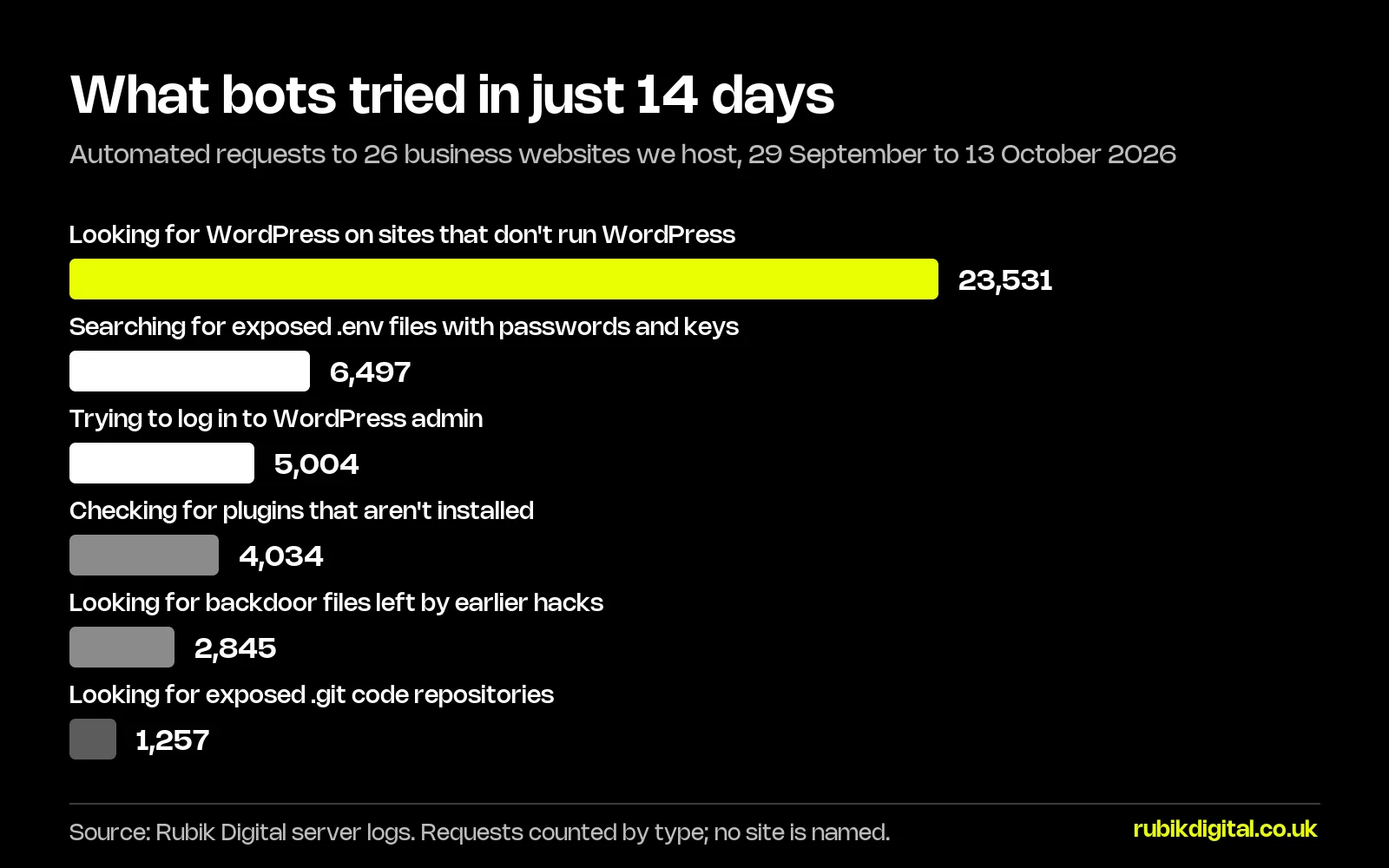
- 5,004 attempts to log in to WordPress from 719 different IP addresses, roughly 360 a day.
- 6,497 requests for
.envfiles, which hold database passwords and API keys on badly configured sites. - 4,034 requests for plugins that weren’t even installed, as bots checked for known vulnerable versions.
- 2,845 requests for file names used by backdoors that earlier attackers leave behind on hacked sites.
- 17 of the 20 sites that don’t run WordPress were still probed for WordPress files, 23,531 requests in total.
None of this was aimed at a particular business. It is automated, constant and indiscriminate. Every website gets it. The only question is whether anything on yours is out of date when it arrives.
"Clients sometimes tell me their website is too small to be a target. The bots don't know or care how big you are. They try the same doors on every site, all day, every day. Maintenance is making sure none of those doors is open." Giedrius Kudzinskas, founder of Rubik Digital
What Website Maintenance Actually Includes
A proper maintenance plan is about preventing problems rather than reacting to them. At a minimum it should cover:
- Software updates – the CMS, plugins, themes and server software, tested before they go live rather than applied blindly.
- Backups – automated daily backups stored away from the website’s own server, with restores tested occasionally.
- Security monitoring – malware scanning, a firewall, login protection and alerts when something changes unexpectedly.
- Uptime monitoring – someone is told within minutes when the site goes down, not when a customer emails.
- Performance checks – page speed and Core Web Vitals tracked so the site doesn’t slowly get heavier.
- Form and checkout testing – confirming that enquiries and orders still arrive.
- Small changes – an allowance of developer time for content edits, new pages or minor fixes.
- Reporting – a short monthly summary of what was updated, fixed and found.
If a plan is very cheap, it is worth asking which of these are missing. Updates without testing and backups that have never been restored are the two most common gaps.
The Running Costs That Are Easy to Forget
Maintenance fees are only part of what a website costs to run. These costs sit alongside them:
| Cost | Typical UK Price | Notes |
|---|---|---|
| Domain name (.co.uk or .com) | £5 – £20 per year | Make sure it is registered in your company’s name |
| Hosting | £10 – £150+ per month | Cheap shared hosting is often the cause of slow, unreliable sites |
| SSL certificate | Usually free | Most good hosts include free certificates that renew automatically |
| Premium plugin or theme licences | £30 – £300 per year each | Expired licences stop security updates |
| Business email | £4 – £12 per user per month | Usually Microsoft 365 or Google Workspace |
| Off-site backup storage | £2 – £20 per month | Often bundled into a maintenance plan |
Hosting deserves particular attention. If your website runs on WordPress, our guide to managed WordPress hosting in the UK explains what a managed host should take care of, and where hosting stops and maintenance begins.
How Much Does WordPress Maintenance Cost?
WordPress maintenance in the UK usually costs £50–£300 a month for a standard business site and £300–£1,000+ for a busy WooCommerce store. WordPress powers a large share of the web, which makes it the most common target for automated attacks, and the vast majority of WordPress vulnerabilities are found in plugins rather than WordPress itself.
That is why the number of plugins on your site is one of the biggest drivers of maintenance cost. A site with 10 well-chosen plugins is quick to update and test. A site with 50, some of them abandoned by their developers, needs far more care and carries far more risk.
A good WordPress maintenance plan should include:
- Updates applied on a staging copy first, then checked before going live
- A review of plugins that are no longer maintained, with safer replacements
- Database optimisation and clean-up of old revisions and spam
- Monitoring for new vulnerabilities in the plugins you actually use
- Checks that caching, image optimisation and the CDN are still working
Pay-As-You-Go vs a Monthly Care Plan
There are three common ways to pay for website maintenance.
| Model | Typical Cost | Works Best When |
|---|---|---|
| Pay-as-you-go | £50 – £150 per hour | The site is simple, rarely changes and isn’t a major source of leads |
| Monthly care plan | £50 – £500 per month | You want updates, security and backups handled with a fixed monthly cost |
| Support retainer | £500 – £3,000+ per month | The website generates revenue and needs regular development, not just upkeep |
Pay-as-you-go looks cheaper, but nobody is watching the site between requests. Problems are usually found by customers, and emergency fixes tend to cost more than the prevention would have.
What Happens If You Don’t Maintain Your Website?
An unmaintained website rarely fails all at once. It degrades quietly:
- Security risk grows. Every month without updates adds known vulnerabilities that automated bots scan for.
- Leads disappear silently. A contact form that stops sending emails is one of the most expensive failures, because nothing on the page looks broken.
- The site gets slower. New plugins, larger images and outdated code add weight over time, which affects both conversions and rankings.
- Search visibility suffers. Broken links, server errors and slow pages make it harder for search engines to crawl the site. If traffic has already fallen, our guide on why Google traffic drops explains what to check first.
- Repairs cost more. Updating a site that is two years behind is a project, not a quick job.
A Real Example: The Staging Site Nobody Was Watching
One case from our own maintenance work shows how quickly small gaps get found. A client’s staging site, the private copy of their website used for testing changes, was discovered by automated bots. They began hammering its login page and its XML-RPC endpoint, an old WordPress feature most business websites never use.
The bursts showed up in our log reviews. When we checked the live website, the same weaknesses were there too, so we closed them:
- Failed login attempts allowed before a lockout cut from 20 to 5
- Instant lockouts for anyone trying usernames that don’t exist
- XML-RPC blocked at the server, before requests reach WordPress
- Automatic security updates for WordPress switched back on
- Three inactive plugins, still sitting on the server, removed
None of these changes took long, and none affected how the website looked or worked. That is typical: most of the value in maintenance comes from someone noticing, not from heroic fixes.
"The most expensive website problems are the silent ones. A broken contact form doesn't show an error page. It just stops sending you leads, and you only find out when the phone goes quiet." Giedrius Kudzinskas, founder of Rubik Digital
How to Work Out What Your Website Needs
The right level of maintenance depends on what the website does for your business. Ask yourself:
- Does the website generate revenue or leads? If a day of downtime would cost you money, you need monitoring and a guaranteed response time.
- How often does it change? Sites that are updated weekly need a time allowance; sites that rarely change need mostly security and updates.
- How complex is it? Integrations with CRMs, booking systems or payment gateways need testing after every update.
- Who would fix it at 6pm on a Friday? If the answer is “nobody”, that is the gap a maintenance plan should close.
Need Your Website Looked After Properly?
We maintain business websites with tested updates, real backups, security monitoring and developers who know your site.
See our website maintenance and support plans or tell us about your website.
Questions to Ask Before You Sign a Maintenance Contract
- Are updates tested on a staging site before going live?
- Where are backups stored, how long are they kept, and when were restores last tested?
- What is the response time for an emergency, and does it include evenings and weekends?
- How much developer time is included each month, and what happens to unused hours?
- Who owns the hosting account, domain and plugin licences?
- What will the monthly report show?
- What happens if the site is hacked while under your care?
If your website has gone a long time without care, start with an independent website audit. It will show what needs fixing first and give you a realistic picture of what ongoing maintenance should cost.
And if you are weighing up maintenance against a rebuild, our guide to website development costs in the UK explains what a new site would cost instead.
Frequently asked questions
Most UK businesses pay between £50 and £500 a month for website maintenance. Small brochure websites usually cost £50–£150 a month, business-critical WordPress websites £150–£500, and ecommerce or custom platforms £500–£2,000+.