A meta tag is a piece of HTML in the head of a page. Browsers and search engines read it to learn what the page is, how to display it and whether to index it. Visitors do not see the tags on the page. They see the result of them: the blue link in Google, the grey text under it, and the card that appears when someone pastes the link into Slack, LinkedIn or iMessage.
This guide covers the tags that still matter in 2026, the one Google has ignored since 2009, and how to write titles and descriptions that survive Google's own rewriting. Titles, links, images and page speed sit in our on-page SEO guide. If the tags are right and the page still will not rank, the next step is usually a technical SEO check.
Meta tags in brief
- Write a unique title for every indexable page, with the topic at the front. About 50 to 60 characters usually fits. Google has no fixed limit and will shorten or replace a title that is vague, repeated or stuffed.
- Write a unique meta description for pages you want clicks on. Google does not rank on it. It may use it as the snippet when it describes the page better than the body copy.
- Skip the keywords meta tag. Google has not used it for ranking since 2009. Put the topic in the title, the heading and the page.
- Use robots tags for instructions, such as noindex on pages that should stay out of search. Use Open Graph tags so shared links show the right title, text and image.
- Canonical and hreflang are link elements, not meta tags. They still belong in the head, next to the tags above.
What are meta tags?
Meta tags, sometimes just called metadata, are elements inside the head of the HTML. A title element names the page. A meta description offers a short summary. A robots meta tag tells crawlers whether to index the page. A viewport tag tells the browser how to lay the page out on a phone.
Search engines use some of this to understand the page and to build the result a person sees. The title is the usual source of the blue link, which Google calls a title link. The description is one possible source of the text underneath, which Google calls a snippet. Getting those two right does not guarantee a ranking. It does decide whether your result looks like the answer to the query.
The tags belong in the head. Putting them in the body does nothing useful, and some browsers will print them on the page. A content management system usually gives you fields for the title and description and writes the tags for you.
What metadata means, and how it differs from meta tags
Metadata is the wider word. It is any information about the page that is not the page's main content: the title, the description, the canonical link, headings, structured data, Open Graph tags, and even HTTP headers such as the status code. Meta tags are the HTML elements that carry some of that information.
People searching for "metadata SEO" or "website metadata" are usually looking for the title and description. Those two are worth the time. The rest of the head is instructions and sharing, which this guide covers later. The work of making the page itself match the query is on-page SEO.
What are meta keywords?
Meta keywords are a single meta tag that lists phrases you would like the page to rank for. It looks like this:
<meta name="keywords" content="pour over kettle, gooseneck kettle, example">
Google stopped using the keywords meta tag for web search ranking in September 2009. The tag had become a place to stuff phrases that were not on the page, so it stopped meaning anything. That is still Google's position. Adding keywords there does not help a page rank, on Google or as a way to look more relevant to other major engines. A stuffed keywords tag is a leftover of an old spam tactic, and it is worth deleting when you find one.
How to use meta keywords
Don't. There is no current way to use the keywords meta tag that improves SEO. If a plugin still has a keywords field, leave it empty.
The useful place for a keyword is where a person and a crawler can both see the topic: the title, the main heading, the first screen of the page, and the anchor text of links pointing at the page. A page about descaling a kettle should say that in the title and in the heading. Listing "descale kettle" only inside a keywords tag does not make the page about descaling.
Meta tags vs keywords
Keywords are the phrases people search. Meta tags are the HTML that describes the page. You research keywords, then you use one main phrase in the title and on the page. You do not paste the whole list into a keywords tag.
A title can carry one primary phrase and a brand. A description can repeat that phrase once, in a sentence a person would actually say. Repeating it five times is keyword stuffing, and Google is more likely to throw the title or description away and write its own.
Which meta tags matter for SEO
Most of the head is either a display hint or an instruction. Very little of it is a ranking signal. This is the set worth having an opinion on.
| Element | What it does | What to do |
|---|---|---|
| title | Names the page. Google's usual source for the title link, and a signal of what the page is about. | Unique, specific, topic first. |
| meta description | A summary Google may use as the snippet. | Unique on pages you want clicks on. Not a ranking factor. |
| meta keywords | A list of phrases in the head. | Leave it out. Google has ignored it since 2009. |
| meta robots | index, noindex, nofollow, nosnippet, max-snippet and similar instructions for that page. | Default is fine. Use noindex only on pages that should stay out of search. |
| viewport | Tells the browser how to scale the page on a phone. | width=device-width, initial-scale=1 on every template. |
| charset | Which character set the page uses. | utf-8, early in the head. |
| og:title, og:description, og:image | The card shown when the link is shared. Google can also use og:title as a title link. | Match the page. Use a real image. |
| link rel=canonical | Names the preferred URL when the same page exists at more than one address. A link element, not a meta tag. | One canonical per page, pointing at the URL you want indexed. |
| link rel=alternate hreflang | Points to the other language or country versions. Also a link element. | Only when you genuinely have those versions. |
Title tags
The title element is the most important line in the head. Google uses it to understand the page and, most of the time, as the clickable title in the results. A specific title will not rescue a thin page. A vague one can waste a page that deserves to be clicked.
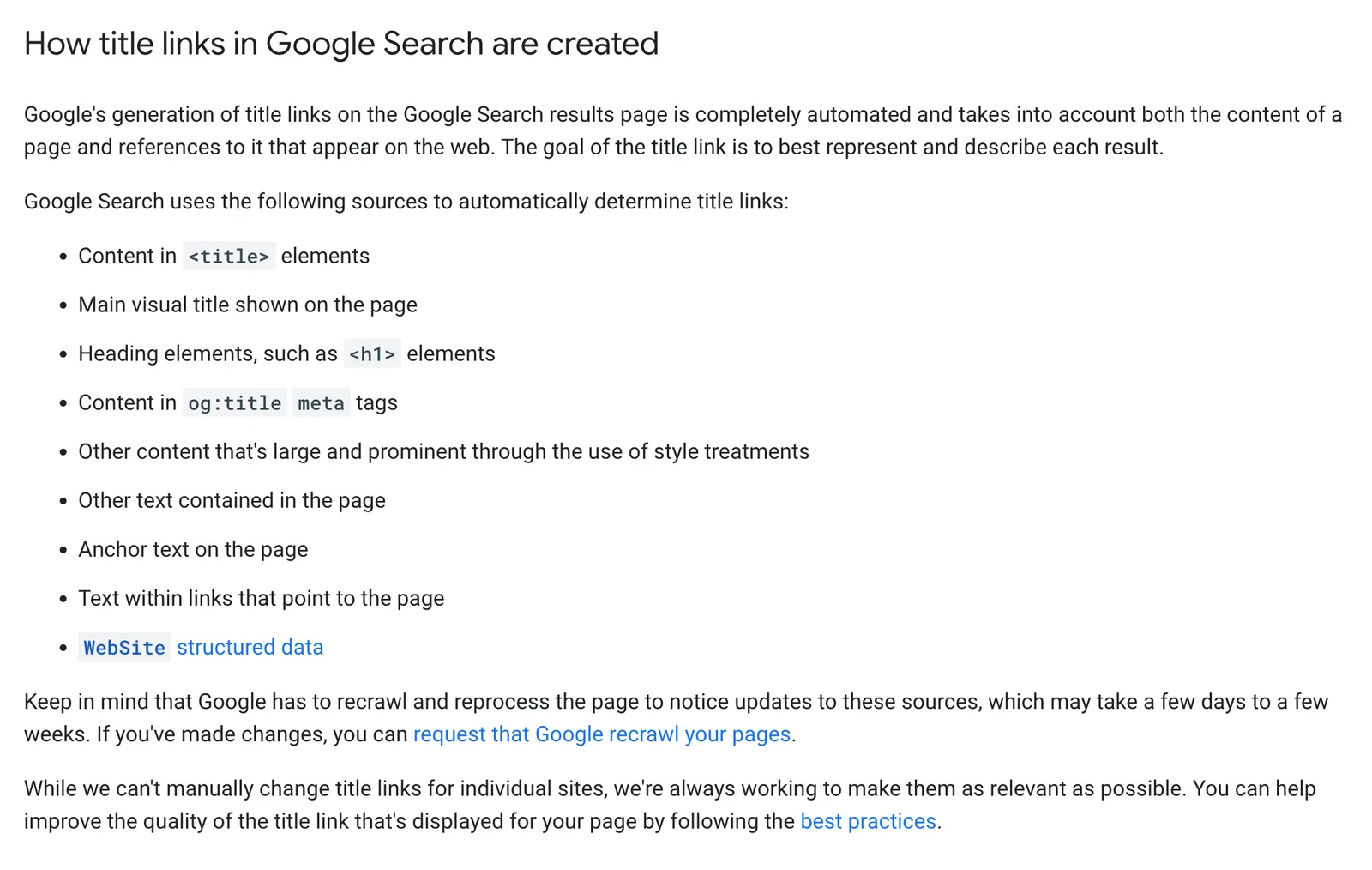
Google generates title links automatically. Its documentation names these sources, in the order it considers them: the title element, the main visual title on the page, heading elements such as the h1, the og:title meta tag, other large prominent text, other text on the page, anchor text on the page, the words other pages use when they link to it, and WebSite structured data. If the title element is empty, generic or stuffed, Google will pick from that list instead.
How long should a title tag be?
Google publishes no character limit and no pixel limit. The title link is shortened to fit the device, so a phone shows less than a desktop. About 50 to 60 characters is a sensible working length because the whole line usually survives. A longer title is acceptable when the words that match the query are at the front. The end of the title is what disappears first.
Very short titles are a different problem. "Home", "Services" or the brand on its own gives Google nothing to work with, so it builds a title from the heading or from other sites' links. That replacement is often worse than a title you wrote.
How to write a title tag
- Name the page. The title should tell someone what they will get if they click, and it should match the h1.
- Lead with the topic. "Descaling a kettle: a five-minute method" beats "A method we like for descaling a kettle".
- One primary phrase. A second, close variant is fine. A list of five synonyms is stuffing.
- Make it unique. Category pages, product pages and posts each need their own title. A template that stamps the same title on every URL is one of the most common faults we see in an SEO audit.
- Skip prices, dates and slogans that go stale. "Kettles from £29" and "Best of 2024" are the titles Google rewrites most readily.
- Match the language of the page. An English title on a page written in another language is a known reason for a rewrite.
Should the brand name go in the title?
On the homepage, yes. The homepage title is the brand plus what the company does. On other pages, add the brand at the end, separated by a pipe, a colon or a hyphen, when you still have room after the topic. Google often drops the site name from the title link anyway, because it already shows the site name above the link. Spending the front of the title on the brand, on every page, throws away the part people read.
Why Google rewrites titles
Google says it rewrites a title when the title element does not describe the page as well as another source would. The usual causes:
- The title is half empty, such as "| Example" or a brand and nothing else.
- The same boilerplate is repeated on many pages, with only a word changed.
- The title is stuffed with keywords, or it does not match the heading and the body.
- It includes an old date or a price that is no longer on the page.
- There is no clear main heading, so Google assembles a title from fragments.
- Google cannot crawl the page, so it falls back to the words other sites use in links. A noindex tag is the right way to keep a page out of search. Blocking the page in robots.txt does not reliably do that, and it can leave Google writing the title from off-site anchors.
After you change a title, Google has to recrawl the page before the result updates. That can take days or weeks. Google Search Console shows the title Google is actually using, under URL inspection.
Title tag examples
| Weak | Stronger | Why |
|---|---|---|
| Home | Example: kettles, filters and spare parts | "Home" describes the site to you, not the page to a searcher. |
| Kettle kettle kettle buy kettle | Gooseneck kettle for pour-over coffee | One phrase, written the way a person would say it. |
| Services | Example | London | UK | Shop | Kettle repairs in London | The topic fits at the front. The brand can go at the end if there is room. |
| Best kettles 2024, prices from £29 | How to choose a pour-over kettle | Dates and prices go stale, and Google drops them. |
Meta descriptions
A meta description is a short summary in the head. Google may show it under the title link. It is not a ranking factor. Google's own documentation says snippets are built from the page content, and that the meta description is used when it gives a more accurate description than the page itself. Different queries can produce different snippets for the same URL.
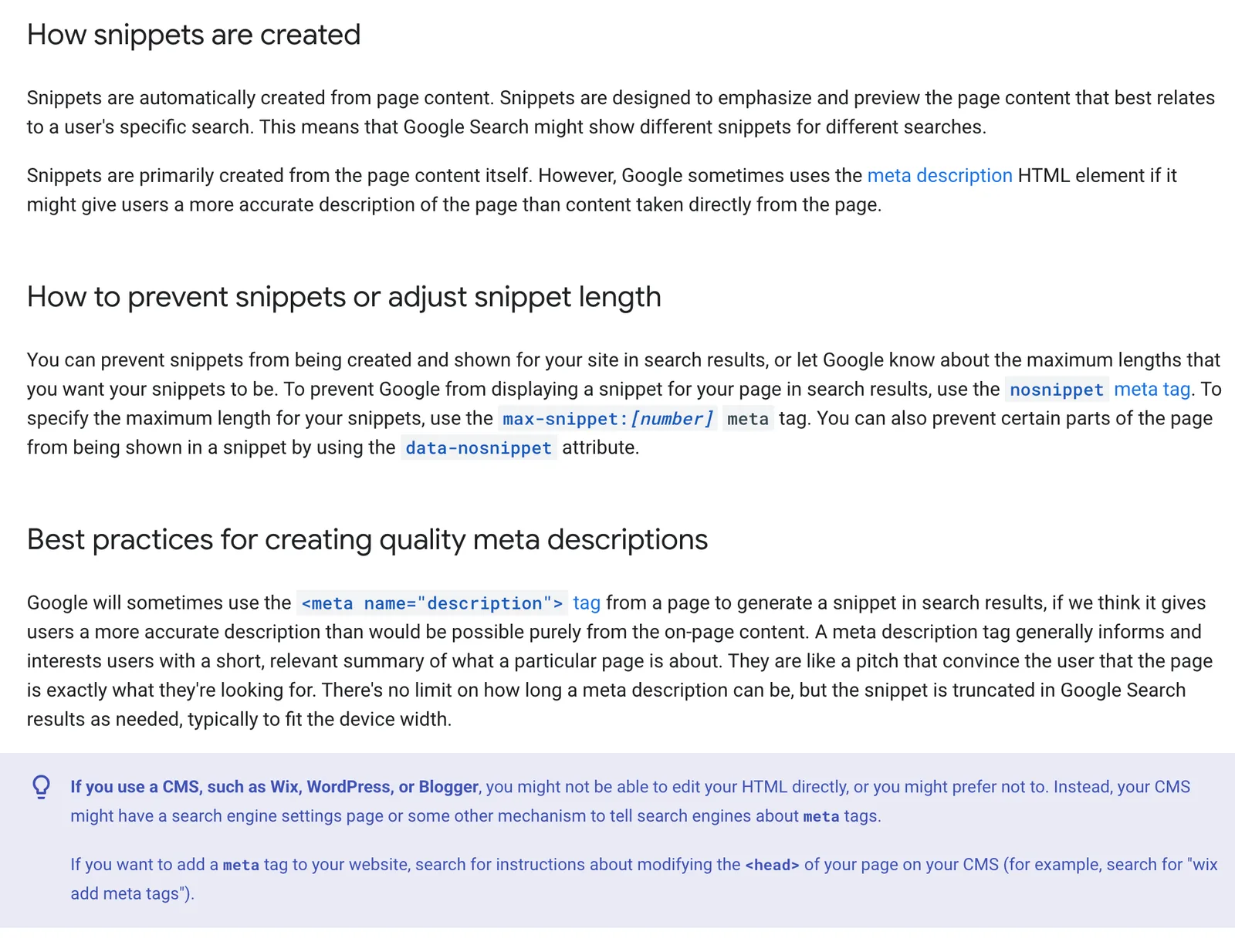
A description is still worth writing. When Google uses yours, you control the pitch: what the page covers, who it is for, and the reason to click. When it ignores yours and quotes the page, that usually means the page text answered the query more directly. Both outcomes are a reason to make the description and the opening paragraph say the same thing, in different words.
How long should a meta description be?
There is no length limit. Google shortens the snippet to the width of the device, which on a desktop is often around 150 to 160 characters. Treat that as a line length, not a rule. Front-load the point so a cut-off snippet still makes sense. A second sentence with a reason to click, a price, an author or a date can still be picked up for a query where that detail matters.
How to write a meta description
- Describe this URL. A description copied across a template, or lifted word for word from the page, is the one Google is least likely to use.
- Include the topic once, in a sentence. The snippet is where people scan for the phrase they just typed.
- Add a reason to click. Delivery, a free trial, who the advice is for, or what the page helps someone do. A call to action works when it is true.
- Prioritise. If you cannot write one for every URL, do the homepage, the money pages and anything that already gets impressions. Programmatic descriptions are fine on a large catalogue when they read like sentences and differ from each other.
- Leave thin pages alone rather than inventing a unique sentence for a filter URL you would rather not have indexed.
Meta description examples
| Weak | Stronger |
|---|---|
| Welcome to our website. We sell many products. Click here. | Gooseneck kettles with a steady pour, from 600ml to 1 litre. Compare flow, capacity and price, and order by 8pm for next-day delivery. |
| kettle, pour over kettle, best kettle, buy kettle, kettle UK | A keyword list. Google prefers a sentence, and it may ignore this and quote the page instead. |
| We are a leading provider of innovative solutions. | What we check in an SEO audit: indexation, titles, duplicates, speed and the pages that should be bringing in enquiries. |
“The tags that change a result are the title and the description. Everything else in the head is an instruction to a crawler or a preview for a social app. Once you treat them that way, you stop spending afternoons on meta keywords.”
How to add meta tags
The tags live in the head. A normal page on a site such as example.co.uk would include:
- <title>Gooseneck kettle for pour-over coffee | Example</title>
- <meta name="description" content="Gooseneck kettles with a steady pour. Compare flow, capacity and price.">
- <link rel="canonical" href="https://www.example.co.uk/kettles/gooseneck">
- <meta name="robots" content="index, follow">
- <meta name="viewport" content="width=device-width, initial-scale=1">
- <meta charset="utf-8">
index, follow is already the default, so that robots tag is optional. Leave out meta keywords. You only need noindex, nofollow or nosnippet when you are changing the default.
WordPress
On WordPress, an SEO plugin adds a title and description box on the editing screen and prints the tags. Use those fields. Editing the theme header as well usually produces two titles. If the plugin offers a keywords field, ignore it. Google's documentation names WordPress, Wix and Blogger as systems where you set this in a search settings screen rather than in the HTML.
Shopify
On Shopify, each product, collection and page has a search engine listing. The homepage title and description are under Online Store, Preferences. Shopify will generate a description from the product text if you leave the field empty, which is why collection pages often share the same snippet until someone writes one.
Concrete CMS
Concrete CMS stores the title and description as page attributes. Fill them in on the page's SEO panel. An empty attribute falls back to the page name, which is how a site ends up with twenty pages titled "Services". Set the attributes on the page types you actually want in search, and keep thank-you and filtered URLs out with noindex rather than a clever title.
Whichever system you use, the new tags appear in search only after Google recrawls. Request indexing for the few URLs that matter this week, and let the rest update on the normal crawl.
Open Graph and X cards
Open Graph tags set the title, description and image that Facebook, LinkedIn, Slack, WhatsApp and iMessage show when someone shares the URL. The usual set is og:title, og:description, og:image, og:url and og:type. An image around 1200 by 630 pixels is the size most of those apps expect.
Google can use og:title as one source for the title link, so keep it aligned with the title element. A social title written for a campaign, and a different title written for search, is a common reason the result and the share card disagree.
X still reads Twitter card tags. summary_large_image, plus twitter:title, twitter:description and twitter:image, produces the large card. If you only set Open Graph, most platforms will fall back to those.
Robots, viewport, charset and redirects
Robots
A robots meta tag applies to the page it sits on. index and follow are the defaults. noindex keeps the page out of search results. nofollow tells Google not to pass equity through links on that page, which is rarely what you want on a normal URL. nosnippet stops the text snippet. max-snippet, max-image-preview and max-video-preview cap how much Google can show. data-nosnippet on an element hides that part of the page from the snippet.
Use noindex for thank-you pages, internal search and thin filters. Do not use it on a page you want to rank. A robots.txt disallow stops crawling and does not reliably stop indexing, and Google may then title the URL from other people's links.
Viewport and charset
The viewport tag, <meta name="viewport" content="width=device-width, initial-scale=1">, tells the browser to lay the page out at the width of the screen. Without it, phones load a zoomed-out desktop page. The charset tag, <meta charset="utf-8">, should come early in the head so punctuation and symbols render correctly. Neither tag is a keyword signal. Both are part of a page that works.
Meta refresh
A meta refresh tells the browser to load another URL after a delay. It is a client-side redirect. Google can treat a refresh used to send people somewhere unexpected as a sneaky redirect. When a page has moved, use a server-side 301. Keep meta refresh for the rare case where you cannot set a server redirect and the destination is an obvious continuation of the same page.
How different search engines use metadata
Google leans on the page itself. The title and description help it label the result. They are not a shortcut to a ranking. Bing has historically paid more attention to the classic on-page signals, including the title and the description, when it decides what a page is about. Writing a clear title and a true description is the right preparation for both. Stuffing either one is the wrong preparation for both. Our Bing and Google comparison covers where the two engines actually diverge.
How to check your meta tags
- View the source and search for <title> and name="description". You should find one of each.
- Open URL inspection in Google Search Console to see the title Google has chosen, which can differ from the one you wrote.
- Look for duplicates across the templates that generate titles: product, category, location and author pages. Search Console no longer has the old HTML improvements report, so a crawl of your own titles is the reliable check.
- Share the URL with yourself in Slack or LinkedIn to confirm the image and text. Those apps cache cards, so a fix can take a second share before it shows.
If titles, descriptions and indexation are messy across a whole site, that is audit work rather than a writing task. We cover the order of checks in how to do an SEO audit.
A meta tag checklist
- Every indexable page has its own title, with the topic at the front.
- Homepage, money pages and pages with impressions have their own description.
- The keywords meta tag is empty or removed.
- Thank-you, search and thin filter URLs are noindex, not merely blocked in robots.txt.
- One canonical points at the URL you want indexed.
- The viewport and utf-8 charset are in the template.
- Open Graph title, description and image match the page.
- Redirects are server 301s, not meta refreshes.
- Search Console shows the title you expect on the pages you changed.
Titles and descriptions are a small part of being found. They decide how the result looks once a page is eligible to show. The pages, the links and the technical health decide whether it is eligible. If you want those checked together, the form above is the shortest way to start.