Bing Webmaster Tools is Microsoft's free dashboard for website owners. It shows how your site performs in Bing search, which pages Bing has indexed and what is stopping the rest. Since February 2026 it also shows how often Microsoft Copilot and Bing's AI answers cite your pages, something Google's tools still don't report in the same detail.
This guide covers setting it up, every report worth your time, IndexNow for WordPress, Strapi and Concrete CMS, and how to fix the problems that stop sites appearing in Bing. Everything here was checked against Microsoft's own documentation and the live tool in October 2026.
Bing Webmaster Tools in brief
- It's free: you need a Microsoft, Google or Facebook account to sign in, and nothing else.
- Setup takes minutes: import your site from Google Search Console and it is verified automatically, sitemaps included.
- It has up to 24 months of search data: clicks, impressions, click-through rate and average position, by keyword, page, device and country.
- It reports AI citations: the AI Performance report shows which pages Copilot and Bing's AI summaries cite, and for which queries.
- It feeds more than Bing: Bing's index powers Copilot, Yahoo, DuckDuckGo's web links and Microsoft's AI grounding service, Web IQ.
- IndexNow gets changes seen fast: one notification tells Bing and the other participating search engines that a page has changed.
What is Bing Webmaster Tools?
Bing Webmaster Tools is Bing's equivalent of Google Search Console. It is where you prove you own a site, tell Bing about your sitemaps, see the searches that bring people to you and find out why pages aren't indexed. It also has tools Search Console doesn't: keyword research, a site audit called Site Scan, backlink comparisons with competitors and control over when Bingbot crawls.
It matters more in 2026 than it did a few years ago. Bing has nearly a fifth of desktop searches in the UK and US, and its index is now the grounding source for Copilot and for AI products built on Microsoft's Web IQ service, launched in June 2026. Our Bing vs Google comparison has the market share figures by country and device.
How to set up Bing Webmaster Tools
Go to bing.com/webmasters and sign in. You then have two ways to add a site, and the first is quicker for almost everyone.
Option 1: Import from Google Search Console
If your site is already verified in Google Search Console, choose Import, sign in with the same Google account and allow Bing to read your Search Console properties. Pick the sites you want and click Import. They are verified straight away and your sitemaps come across with them. Bing then rechecks ownership through Search Console from time to time and picks up any new sitemaps you add there.
You can import up to 100 sites at a time, and an account can hold up to 1,000. If you would rather Bing stopped reading your Search Console account, disconnect it under Profile; you will then need one of the manual methods below to stay verified.
Option 2: Add your site and verify it manually
Enter your site's address. You can add a whole domain, such as example.co.uk, or just one section, such as example.co.uk/blog/. Then prove you own it with one of four methods:
- Automatic DNS verification. If your DNS provider supports the Domain Connect standard, you sign in to it from Bing and the record is added for you.
- XML file. Download BingSiteAuth.xml and upload it to the root of your site, so it loads at example.co.uk/BingSiteAuth.xml.
- Meta tag. Copy the msvalidate.01 meta tag Bing gives you into the <head> of your home page. This is the "Bing site verification code" people search for.
- CNAME record. Add the CNAME record Bing shows you at your DNS host. This suits sites where you can't change the code.
Leave the file, tag or record in place after verifying. Bing checks again, and removing it can unverify the site.
Submit your sitemap
Open Sitemaps and submit the full address of your XML sitemap, for example https://www.example.co.uk/sitemap.xml. If you imported from Search Console, check it is already listed. Bing typically reads sitemaps about once a day, so it is the safety net that catches pages your other signals miss. The report shows when each sitemap was last crawled, how many URLs Bing found in it and, in an Index Coverage chart, how many of those are indexed. Also add a Sitemap: line to your robots.txt so other crawlers find it.
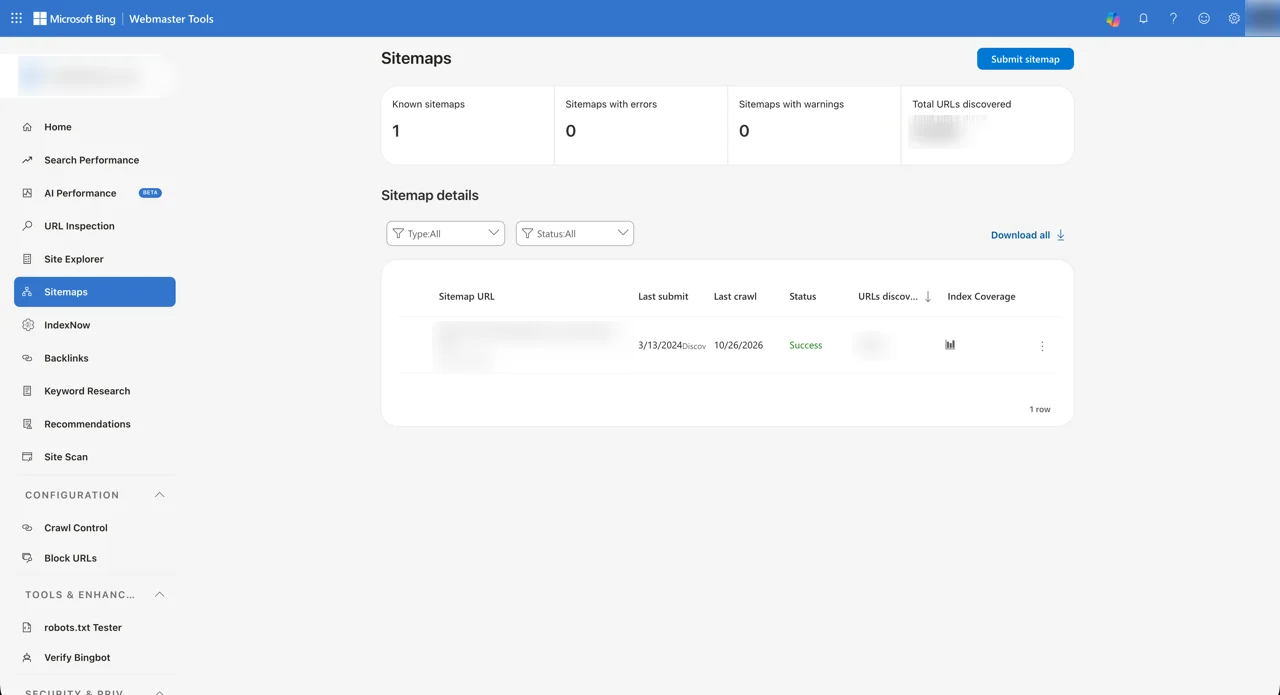
Reports usually start filling within 48 hours of adding a site.
The reports that matter, and what to do with them
The left-hand menu has around a dozen reports, plus smaller tools grouped under Configuration, Tools & Enhancements and Security & Privacy. These are the ones worth checking regularly.
Search Performance
This is Bing's version of Search Console's Performance report: total clicks, impressions, average click-through rate and average position over 7 days, 30 days, 3, 6, 12, 18 or 24 months, or a custom range. Compare mode sets two periods side by side. Below the chart you can list results by keyword, page, device or country, and download everything as a spreadsheet.
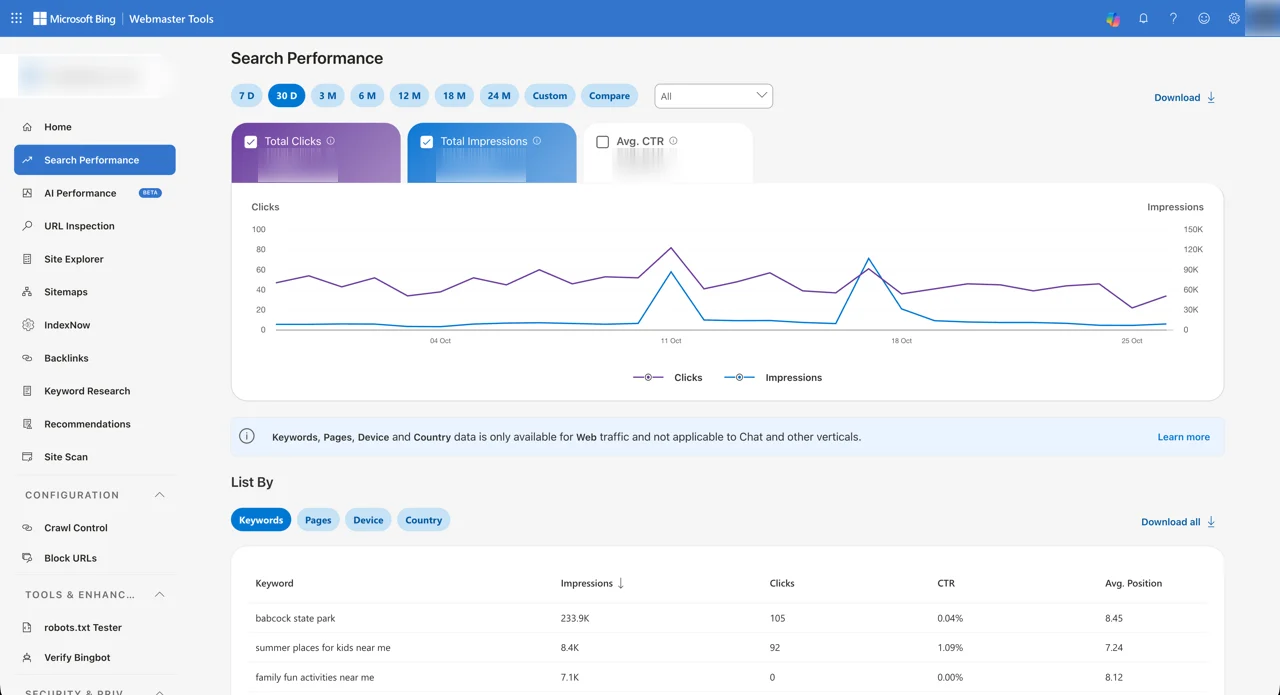
One limitation to know about: the keyword, page, device and country breakdowns cover web results only, not Copilot or other verticals. Use AI Performance for those.
The most useful habit is the same one we recommend in our Google Search Console guide: sort by impressions, look for keywords where you sit between positions 5 and 15, and improve the page that ranks for them. Because Bing is used more on desktops, the device breakdown often shows a higher desktop share than Google does, which is worth remembering if you sell to people at work.
AI Performance
AI Performance, in public preview since February 2026, is the report that sets Bing Webmaster Tools apart. It counts how often your pages are shown as sources in AI-generated answers across Microsoft Copilot, AI summaries in Bing and some partner products. It has two tabs:
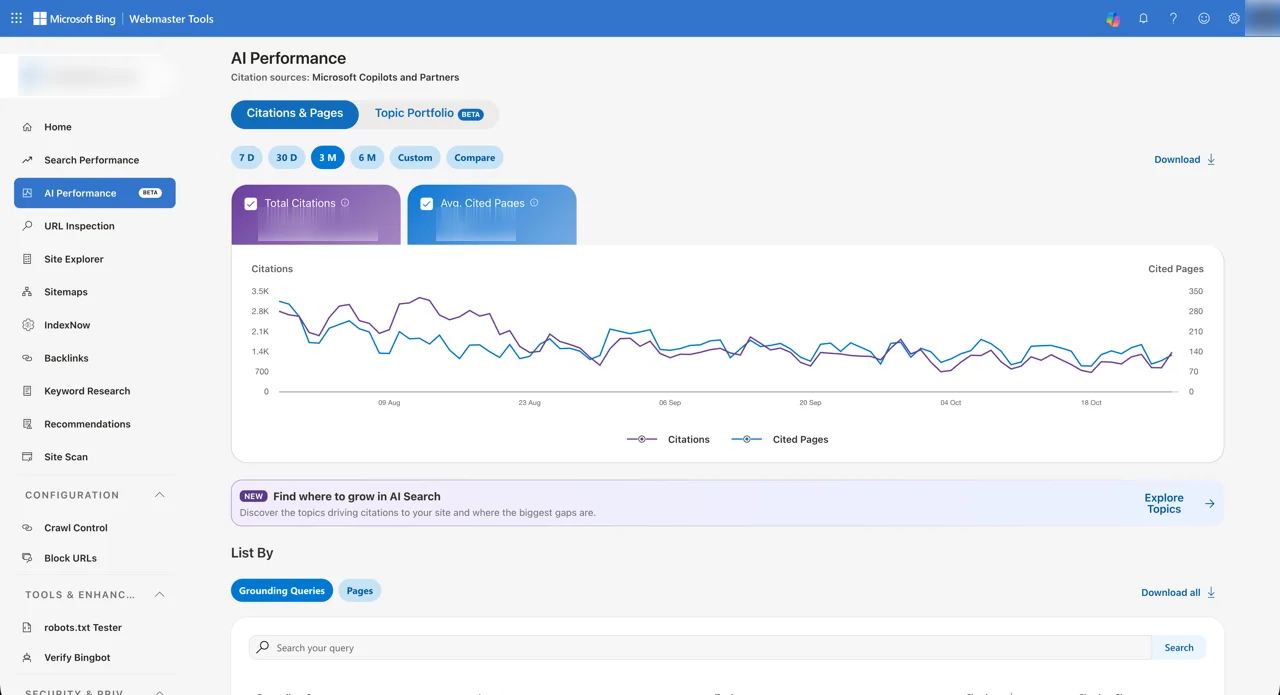
- Citations & Pages: total citations and the average number of your pages cited per day, a trend line, and a table you can list by grounding query or by page.
- Topic Portfolio (beta): groups your citations into topics by month, showing how big each topic is, how many sites are cited in it and how many queries it covers. Below it, Top Opportunity Queries lists searches in those topics that draw the most citations, which are your best openings.
Grounding queries are the phrases the AI searched for when it retrieved your content, which is often not what the person typed. Each one is labelled with an intent, such as informational or research, a topic and your citation share. Microsoft is clear that this is a sample of activity, and that a citation says nothing about where in an answer your page appeared.
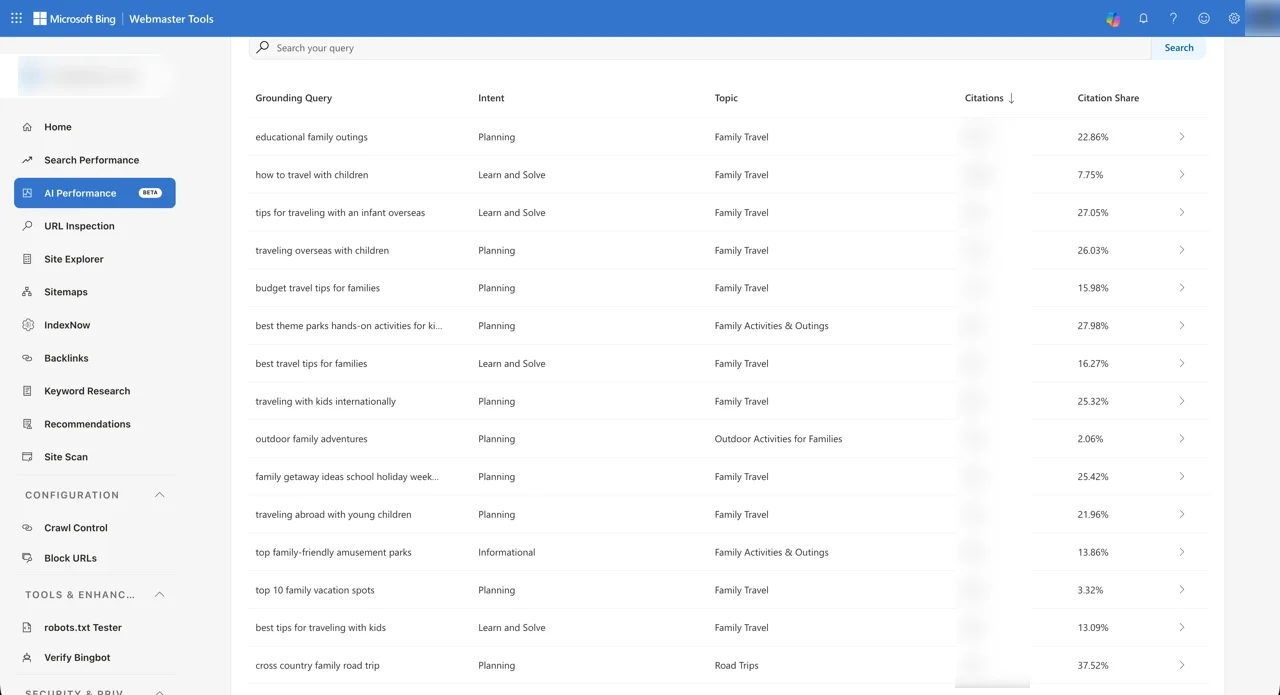
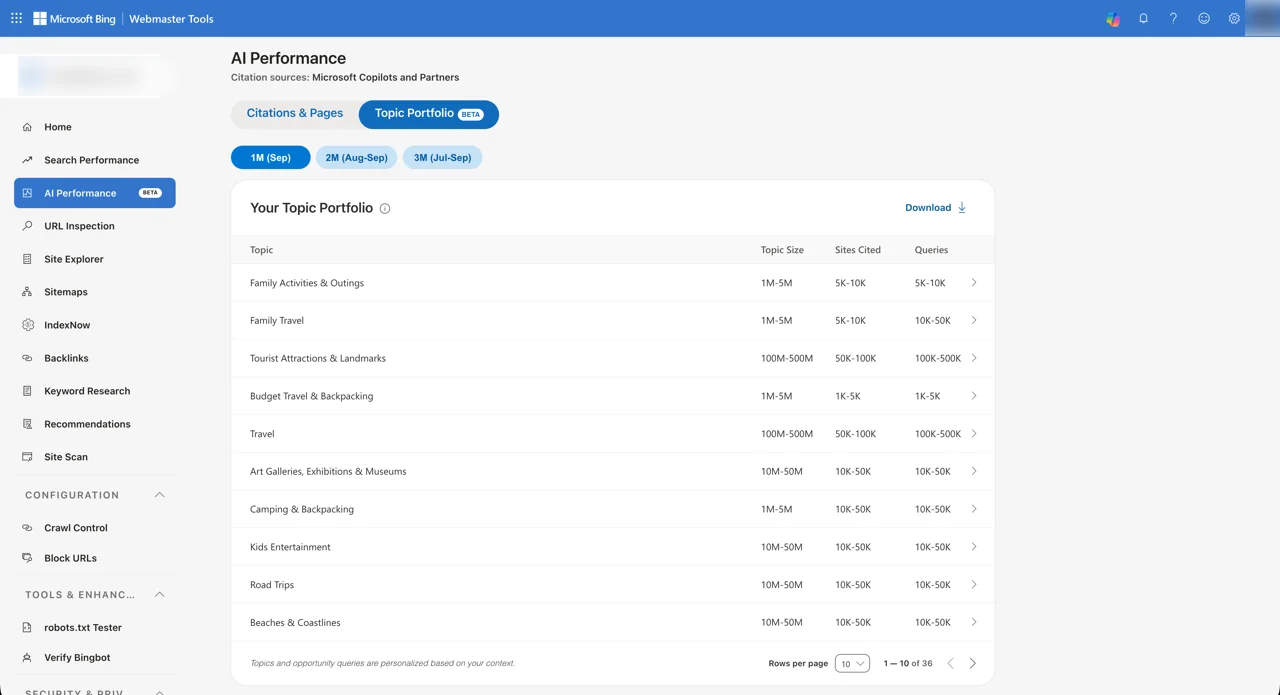
How to use it: look at the pages that are already cited and work out why. They usually answer one question clearly, near the top, with headings, tables or FAQs an AI can lift. Then find pages that rank in Search Performance but are never cited, and give them the same treatment. The date range goes back six months, so check it monthly. Our guide to AI visibility tools covers how to track the AI answers this report can't see, such as ChatGPT and Google's AI Mode.
URL Inspection
Enter any page on your site to see whether it is in Bing's index, when Bingbot last crawled it, and any problems Bing found with its markup or structured data. A live check fetches the page as Bingbot sees it now, which is the quickest way to confirm that a fix has worked. If a page isn't indexed yet, tell Bing about it through IndexNow, covered below.
Site Explorer
Site Explorer shows your site as Bing has crawled it, folder by folder, with counts of indexed pages, crawl errors, redirects and pages blocked by robots.txt. It is the fastest way to spot a whole section Bing can't reach, such as a blog behind a misconfigured redirect.
Backlinks
Lists the sites linking to you, the pages they link to and the anchor text they use. Unlike Google's Links report, it also lets you compare your backlink profile with up to two other sites, which makes it a free, if basic, competitor research tool. This is also where you can disavow links, though very few sites need to.
Keyword Research
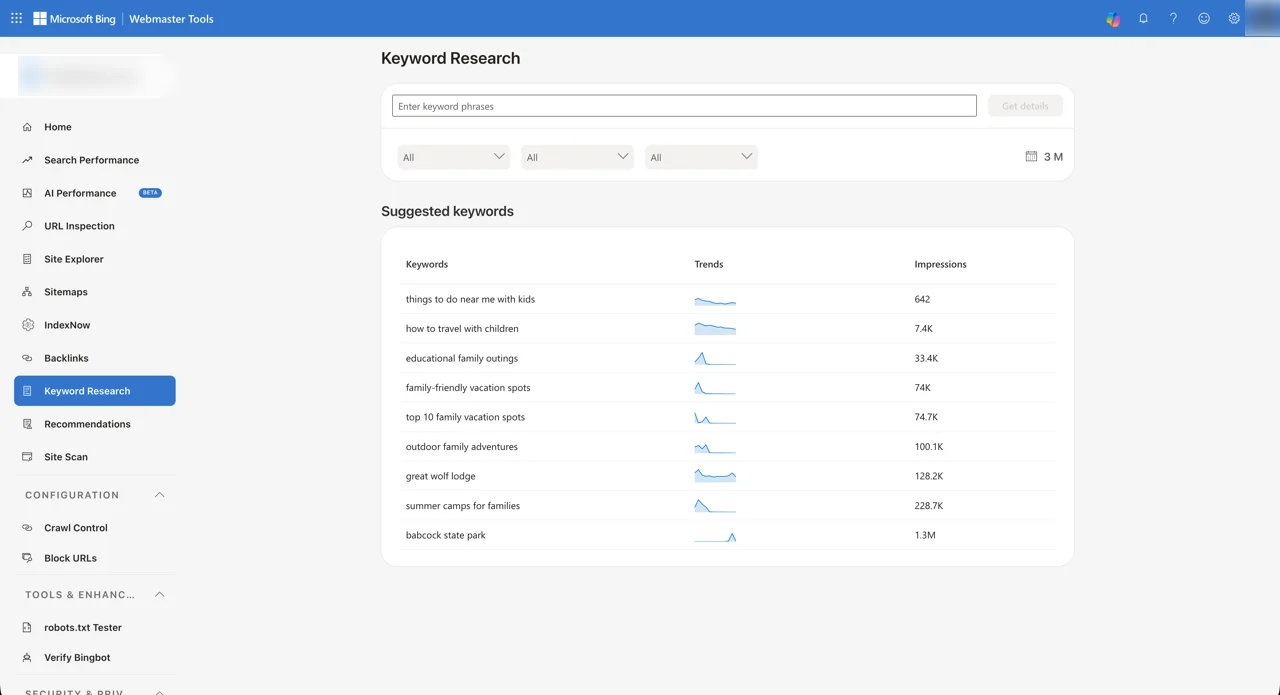
Bing's keyword tool shows how many impressions a phrase had in Bing over the period you choose, a trend line and a breakdown by country, with tabs for related keywords, question keywords and newly discovered ones. It counts impressions in Bing alone, so the numbers are far lower than Google-based tools show, but the trends and related terms are useful, and it costs nothing.
Recommendations and Site Scan
Recommendations lists SEO problems Bing has found across your site, ranked by severity, such as missing titles and meta descriptions and duplicate content. Site Scan is an on-demand audit: you start a crawl of your site, or a section of it, and get a report of errors and warnings. Neither replaces a full SEO audit, but both are free and both reflect what Bingbot actually sees.
Crawl Control, Block URLs and the other tools
- Crawl Control sets how hard Bingbot crawls your site by hour of the day, so busy sites can push crawling into quiet hours. Google removed its equivalent in 2024.
- Block URLs hides a page from Bing results for 90 days while you remove it properly with a 404, 410 or noindex. It doesn't remove anything permanently.
- robots.txt Tester checks whether a URL is blocked for Bingbot before you change the file.
- Verify Bingbot confirms whether an IP address in your logs really belongs to Bingbot, which helps when bots pretend to be it.
- Microsoft Clarity links Bing's free heatmap and session recording tool to the same site.
IndexNow: get new pages into Bing in minutes
IndexNow is an open protocol for telling search engines that a page has been added, changed or deleted. Instead of waiting for a crawler to notice, your site sends a short notification the moment you publish. Bing now strongly recommends it over its own URL submission tools, which it says may be withdrawn in future.
A notification sent to any one participating engine is shared with all of them. In October 2026 those were Bing, Yandex, Naver, Seznam.cz, Yep and Amazon. Google does not take part, so Google still relies on your sitemap, links and Search Console. IndexNow tells engines a page changed; it doesn't guarantee they will index it.
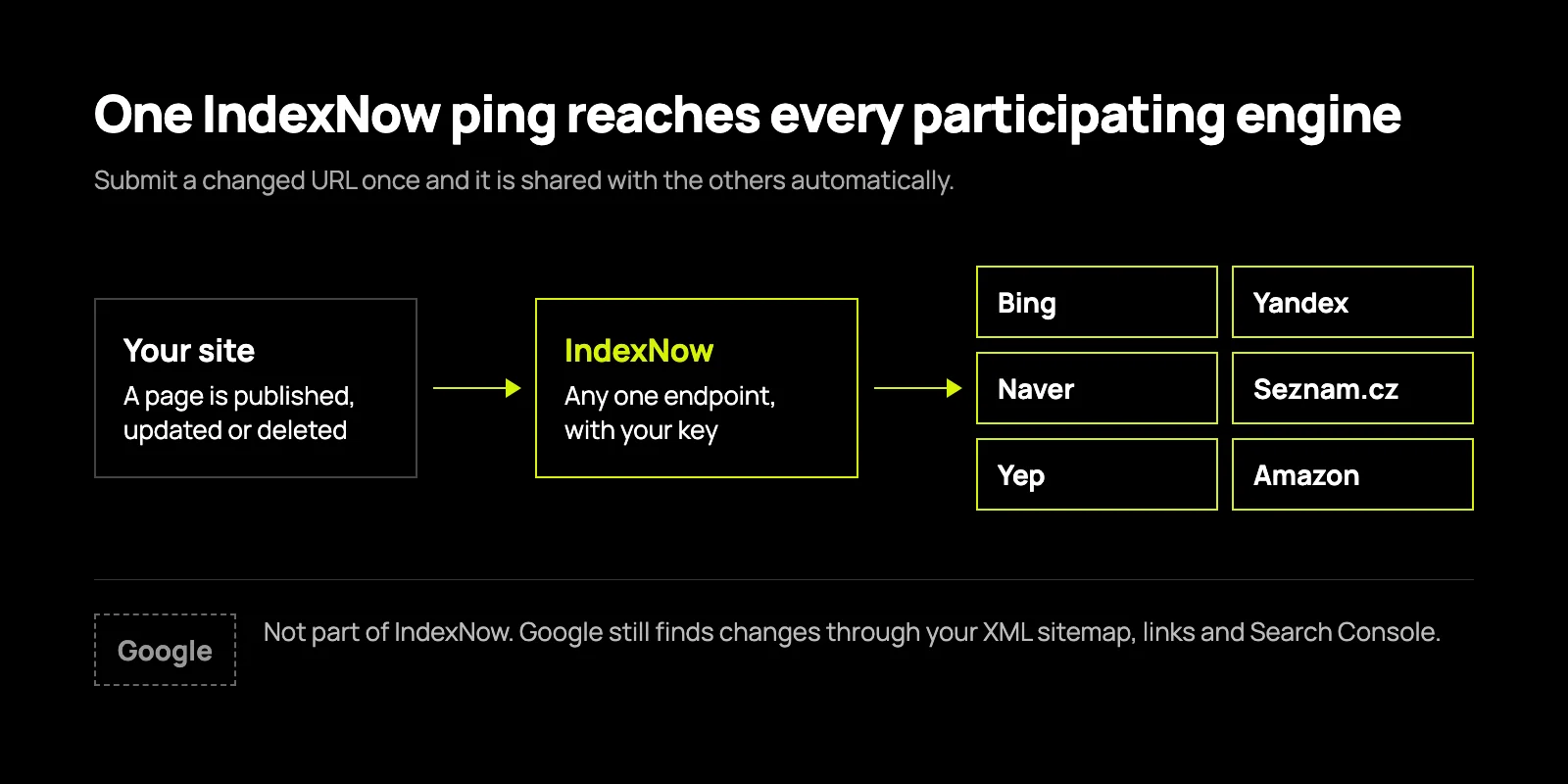
How IndexNow works
- Create a key. Any string of 8 to 128 letters, numbers and hyphens, such as a UUID.
- Publish the key file. Save the key in a UTF-8 text file named after itself, for example example-key-1234.txt, at the root of your site, so it loads at https://www.example.co.uk/example-key-1234.txt.
- Send a notification. For one page, request https://api.indexnow.org/indexnow?url=https://www.example.co.uk/new-page&key=example-key-1234. For up to 10,000 pages at once, POST a JSON body with your host, key and urlList to https://api.indexnow.org/indexnow.
- Check the response. 200 means accepted. 202 means received while the key is checked, which is normal the first time.
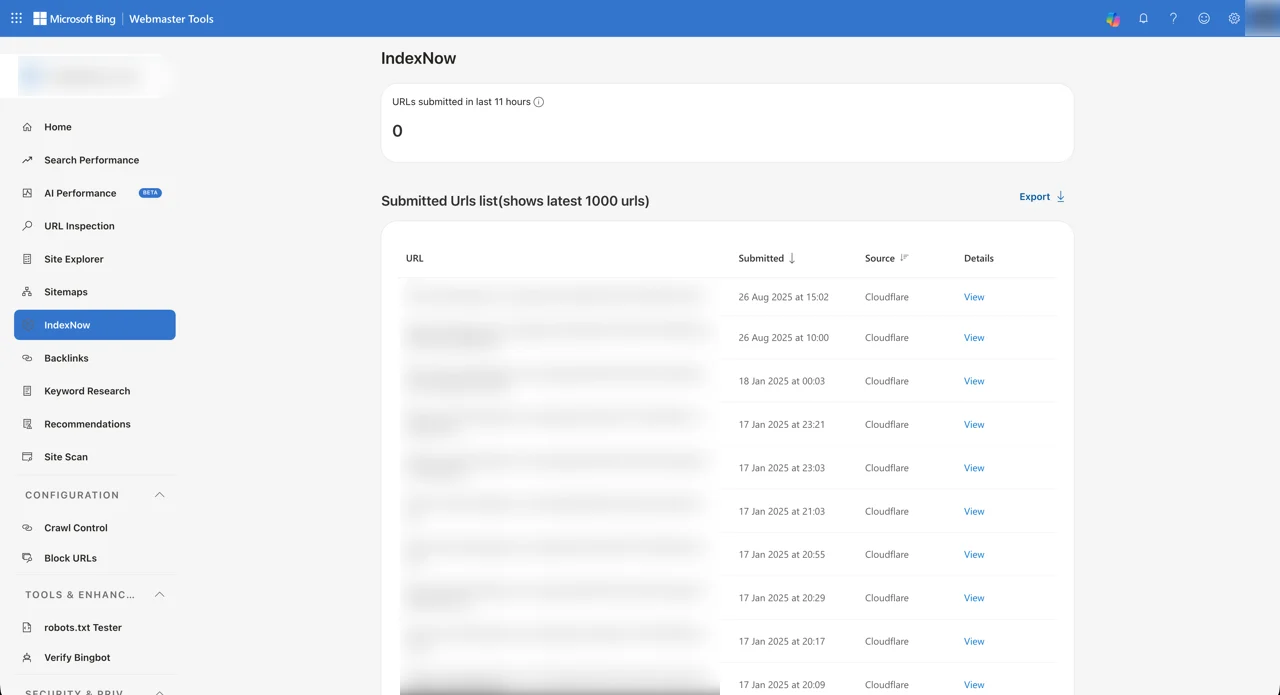
Once it is running, the IndexNow report in Bing Webmaster Tools shows how many URLs you have submitted and whether Bing found problems with them. Most sites never need to do these steps by hand, because their CMS or CDN can do it for them.
IndexNow on WordPress
Install one plugin that supports it, not several. Microsoft publishes its own free IndexNow plugin. Rank Math and All in One SEO include IndexNow in their free versions, and Yoast includes it in Yoast SEO Premium. Each creates the key and notifies search engines whenever you publish, update or delete a post. If you run more than one, you will send duplicate notifications, so switch the others off. Our WordPress team can set this up as part of a support plan.
IndexNow on Strapi and other headless CMSs
A headless CMS doesn't know the public address of the pages it feeds, so the notification has to come from the part that does. The cleanest way is a Strapi webhook on the publish, update and unpublish events that calls a small function on your front end. That function works out the page's URL, for example https://www.example.co.uk/insights/new-article, and posts it to IndexNow, with the key file served from the front end's root. Batch changes made together into one request rather than sending dozens. This is how we wire it into the headless CMS builds we deliver.
IndexNow on Concrete CMS
Concrete CMS has no built-in IndexNow support. A small package that listens for a page version being approved, which is Concrete's publish event, can send the page's URL to IndexNow, and a scheduled task can catch anything missed. Put the key file in the site root as normal. Our Concrete CMS team builds and maintains these packages.
IndexNow through your CDN
If your site sits behind Cloudflare, its Crawler Hints feature sends IndexNow notifications for you when it sees content change, with no code. Our own site runs behind Cloudflare, and its IndexNow report lists Cloudflare as the source. It also shows Cloudflare submitting font and image files as well as pages, which is why notifications from your CMS are the more precise option: they fire on publish, for pages only.
Bing Webmaster Tools vs Google Search Console
You need both. Google sends most search traffic, and Bing's tools report things Google's don't. This is how they compare in October 2026.
| Bing Webmaster Tools | Google Search Console | |
|---|---|---|
| Search performance history | Up to 24 months | 16 months |
| AI reporting | AI Performance: citations, cited pages and grounding queries for Copilot and Bing's AI answers | Generative AI performance: impressions in AI Overviews and AI Mode, without queries or clicks |
| Telling it about new pages | IndexNow, plus URL submission of up to 10,000 URLs a day | Sitemaps, and a small daily quota of indexing requests in URL Inspection |
| Keyword research | Built in, with Bing's own volumes | Only keywords you already appear for |
| Backlinks | Your links, plus comparison with up to two other sites | Your own links only |
| Site audit | Site Scan and Recommendations | Page indexing, Core Web Vitals and enhancement reports |
| Crawl rate control | Crawl Control by hour of day | None since 2024 |
| Quick setup | Imports verified sites from Search Console | DNS record, HTML file, meta tag, or Google Analytics or Tag Manager |
Troubleshooting common problems
Verification fails
For the meta tag, view your home page's source and check the msvalidate.01 tag is in the <head>, not added by a script and not stripped by a caching or optimisation plugin. For the XML file, open example.co.uk/BingSiteAuth.xml in a browser: it must load without a redirect to a login page or a different domain. DNS records can take a few hours to appear. If you are stuck, importing from Search Console avoids all of this.
Bing can't read your sitemap
Open the sitemap address yourself. It must return a 200 status and valid XML, not an HTML error page. Then check robots.txt doesn't block it, and that a firewall or bot protection service isn't challenging Bingbot. Security tools that block unknown bots are a common cause. URL Inspection's live test and Verify Bingbot help you prove which it is.
Pages are discovered but not indexed
Bing doesn't index everything it finds. It is choosier than Google about thin, duplicate and near-empty pages. Check URL Inspection for a technical reason first: a noindex tag, a canonical pointing elsewhere or a block in robots.txt. If there is none, the fix is usually the page itself: make it more substantial and different from your other pages, link to it from pages Bing already indexes, and notify IndexNow when you update it. Bing's Webmaster Guidelines set out what it looks for.
IndexNow returns an error
- 400: the request is badly formed. Check the URLs are complete and encoded.
- 403: the key isn't valid. The key file can't be found, or its contents don't match the key you sent.
- 422: the URLs don't belong to the host in your request, or the key doesn't fit the protocol's format.
- 429: too many requests. Send only real changes and batch them.
No data in the reports
Give a new site 48 hours. After that, very low numbers usually mean Bing sends you little traffic yet, not that something is broken. Check Site Explorer to confirm pages are indexed, then work on the pages that appear in Search Performance.
Is Bing Webmaster Tools worth it?
Yes. Setting it up takes ten minutes if you import from Search Console, and it is free. In return you get a second view of how search engines see your site, a keyword tool, competitor backlink comparisons and the clearest report available of how AI assistants cite you. Add IndexNow and your changes reach Bing, Copilot and the other participating engines within minutes of publishing.
If you want help getting it right, our technical SEO and AI search visibility teams set up Bing and Google side by side and turn what their reports say into a list of fixes.